Zones
Zones represent the spatial structure of your home. They organize your equipments into rooms, floors, and areas -- and they automatically compute real-time status for each space.
Creating zones
Go to Administration > Zones.
Building your zone tree
Zones form a hierarchy (tree structure). A typical setup:
Home
  Ground Floor
    Living Room
    Kitchen
    Hallway
    Bathroom
  First Floor
    Master Bedroom
    Kids Room
    Office
  Outdoor
    Garden
    Terrace
    Garage
To create a zone:
- Click Add Zone
- Enter a name
- Select a parent zone (or none for a root zone)
You can nest zones to any depth, but 2--3 levels is usually enough (Home > Floor > Room).
Reordering zones
Zones have a display order that controls how they appear in the sidebar. You can reorder zones within the same parent by dragging them in the zone list.
Editing and deleting
- Click a zone to edit its name or move it to a different parent
- Delete removes the zone and unassigns its equipments (they are not deleted)
Warning
You cannot delete a zone that has child zones. Delete or move the children first.
Zone aggregation
This is one of Sowel's most powerful features. Every zone automatically computes aggregated data from the equipments it contains. No configuration needed.
What gets aggregated
| Data | Logic | Example |
|---|---|---|
| Temperature | Average of all temperature sensors | 21.5 C (avg of 2 Aqara sensors) |
| Humidity | Average of all humidity sensors | 45% |
| Luminosity | Average of all light sensors | 320 lx |
| Motion | OR across all motion sensors | "Motion" if any PIR detects presence |
| Motion duration | Time since last motion state change | "Calm for 15 min" |
| Lights on | Count of active lights | 2 / 5 lights on |
| Shutters open | Count of open shutters | 1 / 3 shutters open |
| Average shutter position | Average position across all shutters | 65% |
| Open doors | Count of open door contacts | 1 door open |
| Open windows | Count of open window contacts | 2 windows open |
| Water leak | OR across all water leak sensors | Alert if any sensor detects water |
| Smoke | OR across all smoke sensors | Alert if any sensor detects smoke |
| Power | Sum of the zone's consumption submeters | 48 W (a flat's feed + its hob) |
Recursive aggregation
Aggregation is recursive: a parent zone automatically merges data from all its child zones.
Example: The "First Floor" zone aggregates data from Master Bedroom, Kids Room, and Office. If there is motion in any of those rooms, the First Floor shows "Motion". The temperature shown is the average across all three rooms.
This means you can glance at a floor-level zone and know the overall status without checking each room individually.
How it appears in the UI
In the Home view, each zone displays a status header with aggregated data shown as colored pills:
- Temperature pill (e.g., "21.5 C")
- Humidity pill (e.g., "45%")
- Motion pill with duration ("Motion" or "Calm 15min")
- Lights count pill (e.g., "2/5")
- Shutters count pill (e.g., "1/3")
- Alert pills for open doors/windows, water leaks, smoke
- Power pill (e.g., "47 W", or "2.4 kW" above the kilowatt) when the zone has at least one meter
Below the header, equipments are grouped by type (Lights, Shutters, Sensors) with inline controls.
Power aggregation
The power pill answers "how much is this part of the house drawing right now". It sums the equipments a zone holds that measure a load (a dedicated energy_meter, a metering plug, any equipment reporting watts) across the zone and all its descendants. This is what lets one zone total two circuits fed from different boards, which no single meter can do.
Three rules are worth knowing:
- The grid meter and production meters never count. A zone holding your main meter or your solar meter does not add them in, so a total never mixes what the house draws with what it imports or produces.
- No meter means no pill, not "0 W". A zone that measures nothing shows nothing. A zone whose meters all read zero shows
0 W, which is a measurement, and the difference matters. - A reading that stopped arriving is dropped, not counted as zero. A clamp that went quiet says nothing about whether its load is running, so it leaves the sum rather than pulling it down. Sowel re-checks this every minute, so a meter that dies clears itself from the total even in a quiet zone.
A feed meter and its own submeters double-count
If a zone holds both a meter on a circuit and a meter on a load fed by that circuit, the load is counted twice: once inside the feed, once on its own. Sowel has no meter hierarchy, so keep the two in different zones, or read the total knowing what it overlaps. The same overlap already affects the "Other" residual on the Energy page.
Activity feed
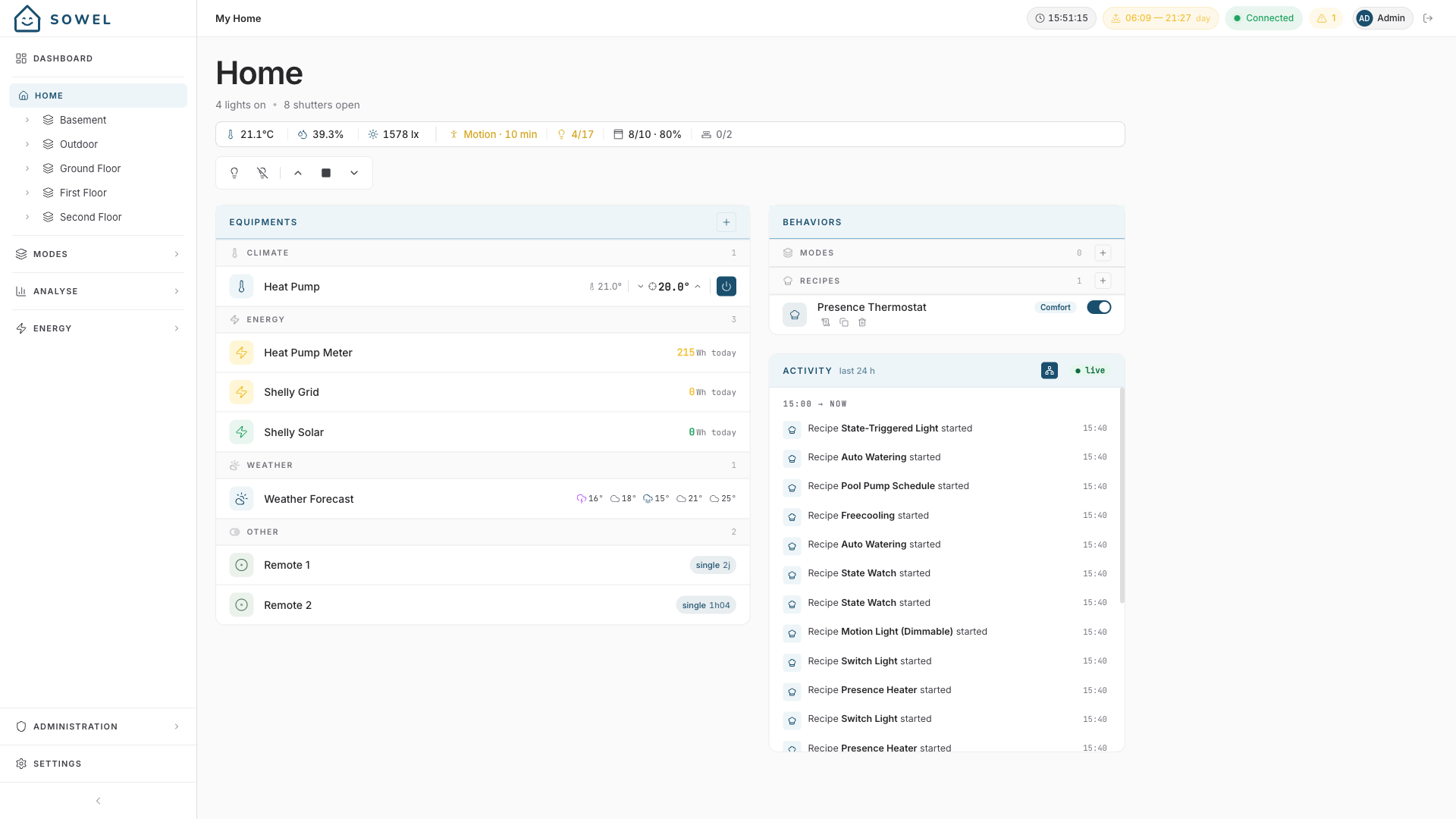
Each zone has a live Activity panel on the right side of the Home view. It is a glance widget that shows what just happened in the zone: orders dispatched, motion detected, recipes started, mode changes, sunrise/sunset, alarms.
The panel groups events by hour. The most recent bucket is labeled HH:00 → now, older buckets are labeled HH:00.
What is tracked
| Category | Triggered by | Example |
|---|---|---|
| Order | Any equipment order dispatched by a recipe, mode, button, manual API call | Lumière → ON manuel, Lumière → OFF par Motion Light |
| Motion | Motion sensor rising edge (binding category motion) |
Motion detected on PIR Living Room |
| Recipe | Recipe instance start / stop | Recipe Motion Light started |
| Mode | Mode activation / deactivation | Mode Night activated |
| Sunlight | Sunrise or sunset transition | Sunset |
| Alarm | System alarm raised, recipe errors, water leak, smoke detection | Smoke detector Kitchen: Smoke detected |
| Alarm (cleared) | The same alarm going away — mains restored, battery back up, plugin reachable again | nut: Retour secteur — ups est réalimenté (batterie à 58 %) |
Each item shows who triggered it: a recipe name, a mode name, "manual" for direct UI actions, the button id, or "external" for inbound MQTT.
Coalescing
When a recipe dispatches multiple identical orders in a quick burst (e.g., Motion Light turns off three appliques at the same time), the feed merges them into a single row with a count: Applique x 1 ×3 → OFF par Motion Light. The window is 500 ms; the same alias, value, and source are required for merging.
Sub-zones toggle
By default, the panel only shows events whose zone matches the one you are viewing, plus events that apply globally (mode changes, sunrise/sunset, system alarms). When you are on a parent zone (for example "Home"), enable the small Network-icon toggle in the panel header to also include events from all sub-zones — that is what the screenshot above shows, with the toggle filled blue.
The toggle appears only on zones that have children. Your choice is remembered across navigation (stored in the browser).
Mobile
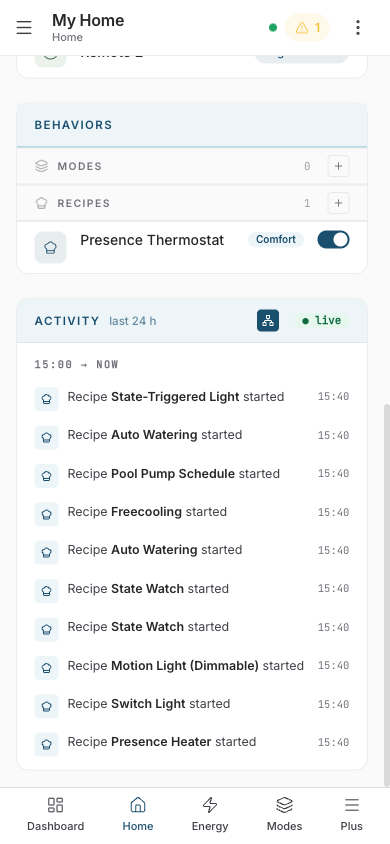
On mobile, the panel sits below the Behaviors section and shows only the 10 most recent items. It is a glance, not a history. To investigate further, use the Logs page.
Live status
The pill in the top right shows ● live when the app is connected to Sowel via WebSocket. If you lose connection it switches to ○ offline and the panel stops receiving new items until reconnection.
Memory window
The Sowel engine keeps the last 7 days of events (capped at 2000 entries) and keeps them across a restart. For anything older, use the Logs page.
Zone orders
Each zone exposes automatic orders that you can use from the UI or in automations:
| Order | Effect |
|---|---|
| All Off | Turns off all equipments in the zone (and child zones) |
| All Lights Off | Turns off all light equipments in the zone |
| All Lights On | Turns on all light equipments in the zone |
These are available in the Home view, in the API, and as actions in recipes and modes.
Tips
- Match your physical layout: Zones should reflect how you think about your home. If you say "the living room", that should be a zone.
- Don't over-nest: Two or three levels (Home > Floor > Room) is usually enough. Deeply nested trees are harder to navigate.
- Outdoor zones: Create an "Outdoor" zone for garden sensors, gate, and any exterior equipment.
- Aggregation drives value: The more sensors and equipments you assign to zones, the richer the aggregated status becomes. Even a single temperature sensor in a room makes the zone header useful.