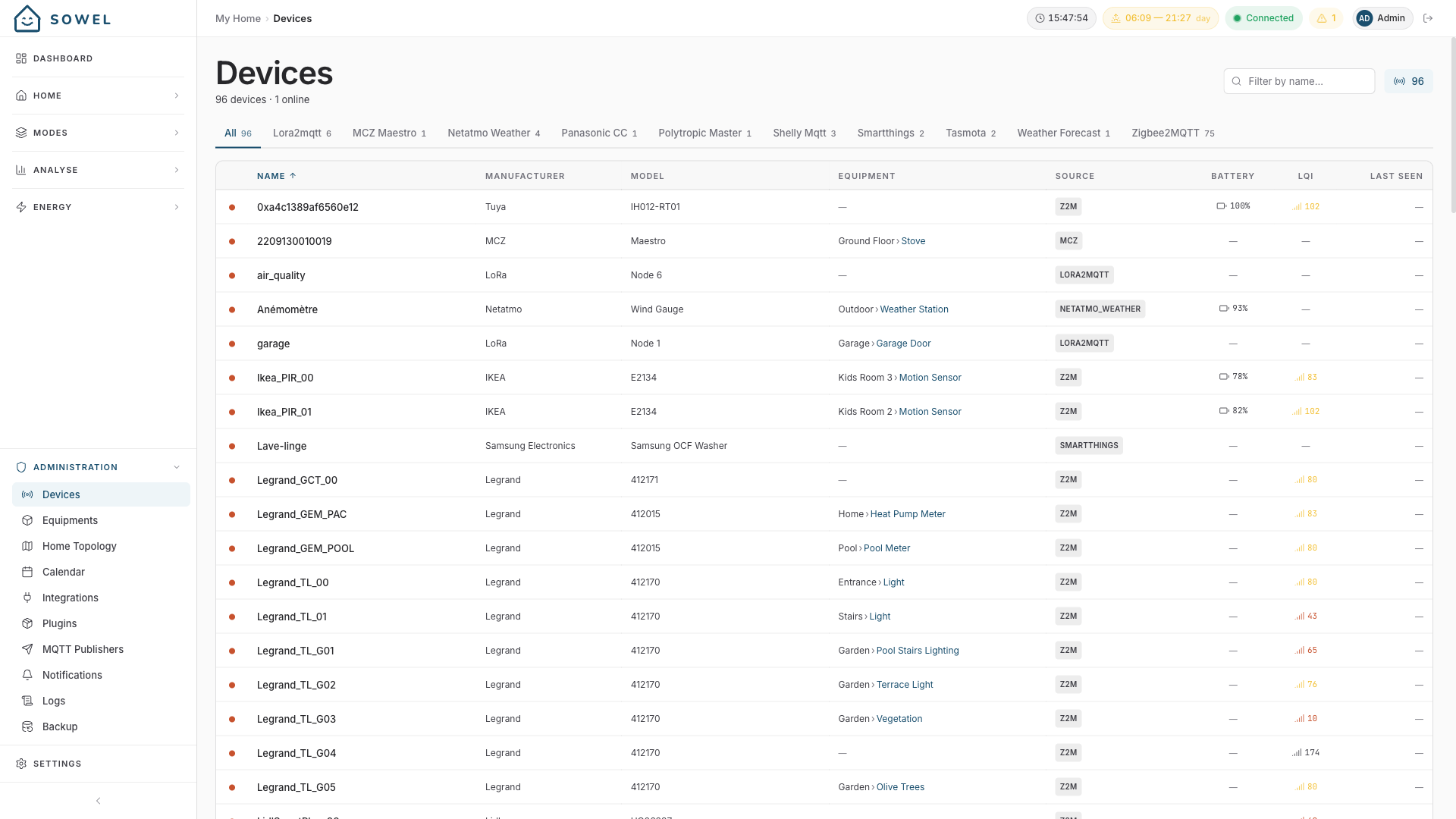
Devices
Devices are everything wired to Sowel: a Zigbee bulb, a Shelly relay, a Netatmo weather station, a LoRa sensor, a Panasonic heat pump talking to a cloud API. Sowel auto-discovers them through integration plugins and turns them all into the same shape.
A Device is what's on the network. An Equipment is what's in the room.
You will rarely manipulate devices directly -- they are the technical layer that everything else in Sowel sits on top of. But understanding what Sowel does to them is what explains why the rest works without glue code.
One data model for the whole house
Every protocol describes its hardware differently. A Zigbee thermometer sends its temperature one way; a Netatmo cloud API sends it another; an ESPHome device sends it a third. If you have ever wired up a "smart home" by hand, you know the cost: every new device means new YAML, new templates, new nuance.
Sowel takes the opposite path. It defines a single, normalized data model, and the plugins do the translation work.
The data model is a closed list of about fifty semantic categories that match what a home actually measures:
| Theme | Categories |
|---|---|
| Climate | temperature, humidity, pressure, co2, voc, noise |
| Light | light_state, light_brightness, light_color_temp, light_color, luminosity |
| Movement | motion, contact_door, contact_window |
| Energy | power, energy, voltage, current |
| Safety | water_leak, smoke, lock_state |
| Outdoors | temperature_outdoor, wind, rain, uv, solar_radiation, weather_condition |
| Pool | pool_water_temperature, pool_temperature_setpoint |
The full list lives in the technical reference.
A temperature is always a number in °C. A motion is always a boolean. A light_brightness is always normalized to the same scale, regardless of whether the underlying device speaks 0--255 or 0--100.
The consequence is simple: the rest of Sowel doesn't care where the data comes from. A zone that aggregates "average temperature" works whether the underlying sensors are Zigbee, LoRa, or a cloud API. A recipe that triggers on motion doesn't need to know which integration provided the signal.
The translation is done by plugins
Every integration ships as a plugin distributed from GitHub:
sowel-plugin-zigbee2mqtt-- Zigbee devices via the Zigbee2MQTT bridgesowel-plugin-shelly-- Shelly relays and meterssowel-plugin-netatmo-hc-- Netatmo Home Coach (weather, air quality)sowel-plugin-panasonic-cc-- Panasonic heat pumps via Comfort Cloudsowel-plugin-mcz-maestro-- MCZ pellet stoves- ... and so on
Each plugin does three things:
- Connect to its data source (MQTT broker, cloud API, serial bridge, ...)
- Discover the devices it sees
- Translate every data point and every command into Sowel's shared vocabulary
You install a plugin once, configure it in Administration > Integrations, and Sowel takes care of the rest. New devices that appear later are picked up automatically.
Browse the plugin catalogue in-app
Open Administration > Plugins to see what is available, install with one click, and update from the same place.
Auto-discovery and auto-typing
When a plugin reports a device, Sowel reads what the plugin exposes and automatically figures out:
- The right category for each data point (
temperature,light_brightness, ...) - The right type (
number,boolean,enum,text) - The right unit (°C, %, kWh, lx, ...)
You write no schema. You configure no binding rules. A new device shows up in Administration > Devices, fully typed, ready to bind to an equipment.
What you actually do as a user
Most of the time, you never touch the devices page. You go straight to Administration > Equipments, click Add Equipment, choose a type ("Light (Dimmable)", "Motion Sensor", ...) -- and Sowel filters the device list to show only the compatible ones. Click. Done.
Stable identity
Each device gets a stable UUID generated from its (integrationId, sourceDeviceId) pair. The practical consequences:
- Re-pair a Zigbee device and it keeps the same UUID -- your equipments and recipes stay bound to it.
- Migrate to a new Zigbee2MQTT instance and, as long as the source device IDs are preserved, your home still works.
- Reinstall an integration plugin and your devices come back with the same identities.
This sounds boring until the day you have to do it.
With several Zigbee coordinators
A home with several Zigbee coordinators runs one Zigbee2MQTT instance per coordinator, all declared in a single plugin — see the "Several Zigbee coordinators" section of Preparing the Host. The first network in the list keeps its device names as-is; the following ones prefix theirs with their base topic, so that two networks can host a kitchen_lamp each without their devices merging.
That prefix is part of the source device ID, so it falls under the rule above:
- Adding a network at the end of the list leaves every existing device untouched.
- Reordering the list, renaming a base topic, or adding or removing a prefix changes the source device IDs of the affected network. Those devices are recreated as new ones, and their equipment bindings are dropped.
Decide the naming before you bind
Right after you declare a new network, its devices have no bindings yet — that is the one moment where changing your mind about the prefix costs nothing. Once you have built equipments on top, it does not.
If your device names are unique across all your networks, dropping the prefix (zigbee2mqtt_annex:, with a trailing colon) keeps a single flat inventory sorted by name, rather than pushing a whole network to the bottom of the list under its base topic. The trade-off is that two devices sharing a name would then silently become one.
Why it matters
Most home automation tools ask you to write rules against raw protocol-specific events:
# A typical hand-rolled setup
- alias: motion_kitchen_light
  trigger:
    platform: mqtt
    topic: zigbee2mqtt/aqara_motion_kitchen
    payload_path: $.occupancy
  action: ...
That works -- until you replace the Aqara sensor with a Tuya one, add a second sensor, or split the kitchen into a zone with three motion points. Now you have multiple alias rules, MQTT topics in your code, and a maintenance burden that grows with your hardware.
Sowel sits one layer above that. Recipes and zones reference categories and aliases (motion, temperature, state), not topics or vendor-specific identifiers. The plugin does the translation work once, and everything you build on top -- equipments, zones, recipes -- keeps working when the hardware changes.
Same data, three sources
A Zigbee bulb, a Shelly relay, and a Netatmo station all expose temperature the same way: same category, same unit, same equipment binding. Swap any one of them out -- nothing else needs to change.
For developers
If you are writing or extending an integration plugin, the technical reference is here:
- Devices -- technical reference -- full type signatures, schema, category list
- Plugin Development -- writing a plugin, registering devices, exposing data and orders
- Architecture -- where devices fit in the reactive pipeline